How to Make a One Pager: Easy Steps + Free Examples
Learn how to create effective one-pagers that grab attention quickly. Discover the best practices and how Distribute can help you make professional one-pagers.
How to Make a One Pager: Easy Steps + Free Examples

A one-pager is exactly what it sounds like—a document that fits on just one page. It gives a quick look at your product, service, or idea. One-pagers work well for initial presentations and are particularly valuable in sales and marketing contexts.
What is a One Pager?
A one-pager is a concise, single-page document designed to communicate key information about your product, service, or idea quickly and effectively. Think of it as your elevator pitch in document form—it needs to capture attention, convey value, and prompt action, all within the confines of a single page.
One-pagers are versatile tools used across various business contexts:
- Sales teams use them to introduce products to prospects
- Startups use them to pitch to investors
- Marketing teams use them to summarize campaigns or services
- Product teams use them to communicate feature releases
Why Use a One Pager in Sales and Marketing?
Research indicates people maintain focus for approximately 8 seconds. A well-crafted one-pager enables sales teams to rapidly communicate offerings, highlight benefits clearly, and motivate action. Without compelling content, audiences may disengage quickly.
In today's fast-paced business environment, you have roughly 8 seconds to capture someone's attention. A one-pager is designed to deliver maximum impact within that critical window.
Key Benefits of One-Pagers
Quick Communication
Deliver your core message in seconds, not minutes
Focused Messaging
Force yourself to prioritize only the most important information
Easy Sharing
Simple to share via email, print, or digital platforms
What to Include in a One Pager Template?
Every effective one-pager should include these six essential components:
1. About Us/Summary
Start with a brief company description highlighting your distinctive qualities in 1-2 sentences. This is your chance to establish credibility and context immediately.
2. Problem Statement
Clearly explain what challenge or pain point your product or service addresses. Your audience should immediately recognize themselves in the problem you're describing.
3. Features and Benefits
Use bullet points to list your main functionalities and their user advantages. Focus on benefits, not just features—tell them what they'll gain, not just what you offer.
4. Social Proof
Include customer testimonials, case studies, or metrics demonstrating your effectiveness. Numbers and real results speak louder than claims.
5. Clear Call-to-Action (CTA)
Provide specific instructions for next steps. Whether it's scheduling a demo, downloading a resource, or making a call, make the action obvious and easy.
6. Contact Information
Include all relevant contact details: phone, email, website, and social media. Make it effortless for interested parties to reach you.
Best One-Pager Examples for Inspiration
Looking at successful one-pagers can help you understand what works. Here's an example that demonstrates proper page organization, appropriate word choice, and effective visual design:
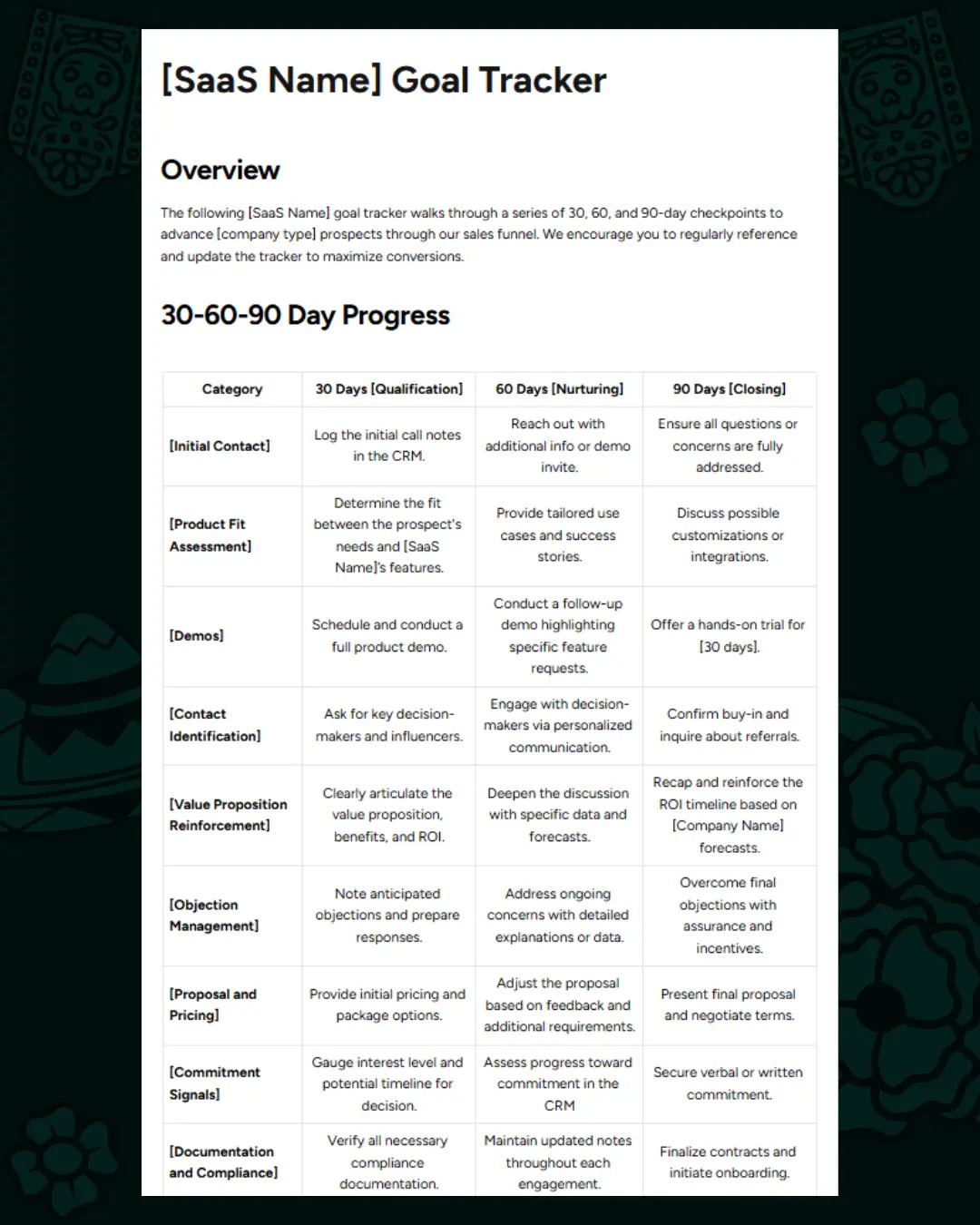
This SaaS sales tracker template illustrates checkpoint qualification over 30, 60, and 90-day periods, showing how to organize complex information in a digestible format.
How to Create a One Pager: A Step-by-Step Guide
Step 1: Define Your Goal
Before you start designing, determine the primary purpose of your one-pager. Ask yourself:
- What action do I want readers to take?
- Is this for a product launch, service explanation, or partnership request?
- What's the single most important message I need to convey?
Step 2: Know Your Audience's Problems
Document the specific pain points your audience faces that your offering resolves. The more specific you can be, the more your one-pager will resonate.
Interview your existing customers or sales team to understand the exact language your audience uses to describe their problems. Use that same language in your one-pager for maximum impact.
Step 3: Create an Interesting Title
Develop a brief, engaging headline that conveys your value proposition. Your title should:
- Be clear and specific
- Promise a benefit
- Create curiosity or urgency
Step 4: Fill Your One Pager with Content
Integrate all the essential sections mentioned above with clear organization. Remember:
- Keep paragraphs short (2-3 sentences max)
- Use bullet points liberally
- Lead with the most important information
Step 5: Design Your One Pager Clearly
Your design choices can make or break your one-pager. Follow these principles:
Simple Visuals
Use pictures and icons that support your message, not distract from it
Keep It Clean
Avoid clutter—white space is your friend
Stay Consistent
Use your brand colors and logos throughout
Organize Clearly
Use headings and bullet points for visual hierarchy
Tips for Clear and Interesting Writing
Writing for a one-pager is different from other content types. Every word must earn its place.
Know Your Audience
Write directly to your target reader. Use "you" language and address their specific situation.
Stick to Main Points
Ruthlessly cut anything that doesn't directly support your main message. If it doesn't help convince the reader to take action, remove it.
Use Simple Words
Avoid jargon and complex language. Write at a reading level that anyone can understand quickly.
Include Pictures
Strategic visuals can communicate complex ideas faster than text. Use charts, icons, and images to break up content and illustrate key points.
Have a Clear CTA
Your call-to-action should be unmistakable. Use action verbs and make it visually prominent.
After writing your one-pager, read it aloud. If any sentence sounds complicated or takes too long, simplify it. Your one-pager should be scannable in 30 seconds and readable in under 2 minutes.
Frequently Asked Questions (FAQ)
How long should a one pager be?
A one-pager should remain concise, fitting comfortably on a single page. This typically means around 300-500 words, though the exact count depends on your design and visual elements.
Can I use the same one-pager template for different products?
Yes, quality templates enable reusability across different products while maintaining consistency. Create a master template with your branding, then customize the content for each product or audience.
Should I use many pictures on my one pager?
Use visuals strategically to support text without excessive imagery. The ideal ratio is typically 60% text to 40% visuals, but this varies based on your message and audience. Maintain text-visual balance for maximum readability.
How do I know if my one pager is working?
Analytics tools can track views, clicks, and conversions to inform improvements. Monitor:
- How often it's being viewed
- How long people spend with it
- What actions people take after viewing
- Feedback from sales conversations
Why Use Distribute to Create One-Pagers?
Distribute makes it easy to create, share, and track professional one-pagers that drive results.
Distribute offers powerful features specifically designed for creating effective sales content:
Drag-and-Drop Builder
User-friendly interface for creating professional content without design skills
Brand Customization
Quick brand customization with your colors, logos, and fonts
Tool Integrations
Integration with tools like Calendly and Gong
Built-in Analytics
Track views, engagement, and conversions
AI-Powered Suggestions
Get intelligent recommendations to improve your content
Team Collaboration
Work together with your team on content creation
Conclusion
Creating an effective one-pager doesn't have to be complicated. By following the steps outlined in this guide—defining your goal, understanding your audience, crafting compelling content, and designing with clarity—you can create one-pagers that capture attention and drive action.
Remember the key principles:
- Keep it simple - One page means one main message
- Focus on benefits - Tell them what they'll gain
- Make it visual - Use design to enhance comprehension
- Include a clear CTA - Tell them exactly what to do next
- Track and iterate - Use analytics to improve over time
Ready to create your first professional one-pager? Distribute makes it easy to build, share, and track beautiful sales content that converts. Get started today and see how the right one-pager can transform your sales conversations.
Want to learn more about creating effective sales content? Explore our other articles on digital sales rooms, buyer enablement, and sales best practices.
Andrew Mewborn
Content Specialist at Distribute. Exploring the intersection of AI, sales, and buyer enablement.
Related Articles
Build a Better Sales Tech Stack to Close More Deals
A sales tech stack is the collection of software your sales team uses to do their jobs better and faster. Learn how to build one that actually works.
Top Highspot Alternatives for Startups & SMBs (2025 Guide)
You don't need 'Sales Enablement Governance.' You just need to close deals. Here's why modern teams are skipping enterprise platforms like Highspot.
The Folder Chaos Cure: How to Organize Sales Collateral So Buyers Actually Read It
You send a shared folder with all the right content. And then... nothing. The problem isn't your content. The problem is your delivery. Here's how to fix it.